strauss

A Python package for turning data into sound

David Wright

2026-04-24

What We’ll Be Covering Today

  1. What is sonification?
  2. Why strauss?
  3. The strauss pipeline
  4. The five modules
  5. Example applications
  6. Takeaways

Reference: Trayford & Harrison, ICAD 2023 (arXiv:2311.16847)

What is Sonification?

Sonification

  • Representing data with sound, the way a plot represents data with ink
  • Complements visualization — sometimes replaces it
  • Useful when:
    • Data is large or multi-dimensional (e.g. hyperspectral cubes)
    • Data is streaming or transient (monitoring)
    • Visualization is inaccessible (blind / low-vision users)

A Plot–Sound Analogy

A plot encodes data in:

  • position on axes
  • color
  • marker shape
  • line style

A sonification encodes data in:

  • pitch
  • volume
  • timbre
  • spatial direction
  • tempo / onset time

The mapping choices matter as much as the data.

Why strauss?

The Existing Tools

Two extremes, nothing in the middle:

Specialized tools

  • One trick each
  • Low effort, low flexibility
  • e.g. astronify, SonoUno, Highcharts

Audio workstations / synthesis envs

  • Infinite flexibility
  • Very steep curve
  • e.g. Csound, Max/MSP, Ableton

strauss is designed to sit between them.

Design Philosophy

  • Low barrier, high ceiling
    • Presets for newcomers, full parameter access for experts
  • Integrate, don’t replace
    • A Python import, not a new IDE
  • Modular and transparent
    • Each stage of the pipeline is its own Python class
  • Tutorial-driven development
    • New features get a notebook before they get code

The Pipeline

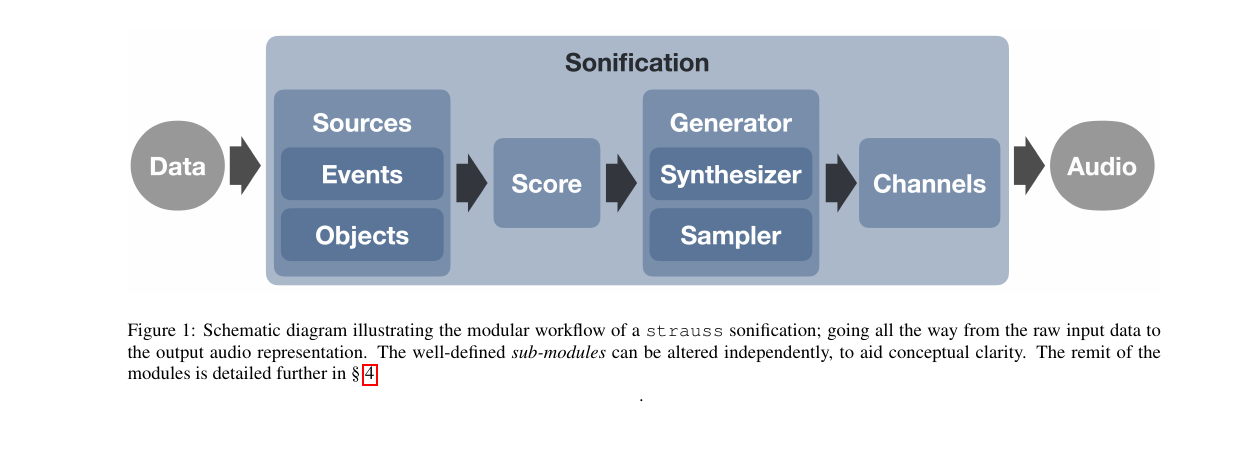
The strauss Workflow

Data goes in, audio comes out. Each blue box is an independent Python class.

The Five Stages

flowchart LR
    D[(Data)] --> S[Sources]
    S --> SC[Score]
    SC --> G[Generator]
    G --> CH[Channels]
    CH --> A[[Audio]]

Stage Role
Sources Who plays (mapping data → sound parameters)
Score Key, chord, duration
Generator Instrument (sampler or synthesizer)
Channels Spatial mix (mono, stereo, ambisonic, …)
Sonification Top-level class; calls render()

The Modules

Sources

A Source is one virtual performer in a 3D scene.

Two subclasses:

  • Events — single occurrences (a supernova, a lightning strike)
  • Objects — persistent, evolving sources (a galaxy across 13 Gyr)

Parameters you map to data:

  • pitch, volume, cutoff
  • azimuth, polar (3D direction)
  • ADSR envelope
  • LFO freq / amount (vibrato, tremolo)

Full list in Table 1 of the paper.

Score

  • Defines the musical constraints on the output
  • Sets total duration of the sonification
  • Specifies a chord, or a sequence of chords
  • Data values get binned onto chord tones in ascending order

Why bother? Raw data → continuous pitch sounds like a theremin. Quantizing onto a chord makes it listenable.
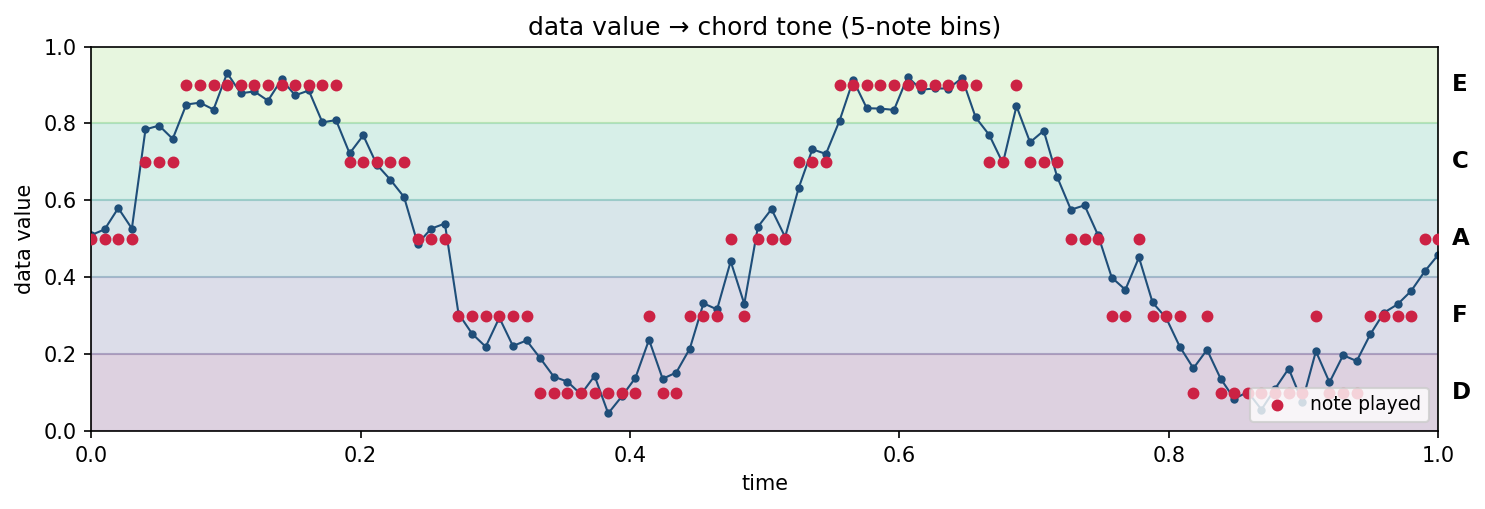
Data value at each time step (blue) is snapped to the nearest chord tone (red). Here, 5 notes → 5 bins.

Generator — Three Flavors

Sampler

  • Plays pre-recorded samples
  • Ships with mallets, glockenspiel
  • Organic, recognizable timbres

Synthesizer

  • Additive: saw / square / sine / tri / noise
  • Detune, ADSR, LFOs, filters
  • Presets in YAML (default, winter, magma)

Spectraliser

  • Special case of the synth
  • Inverse FFT on an input spectrum
  • The data is the waveform

The five oscillator shapes the synthesizer can combine.

What Ships in the Box

Synthesizer presets (.yml)

  • default — three detuned saws
  • pitch_mapper — single oscillator, clean pitch
  • windy — filtered noise, textural
  • spectraliser — IFFT from a spectrum

Sampler presets + samples

  • default, staccato, sustain
  • Mallets (full chromatic, ~5 octaves)
  • Glockenspiels
  • Solar-system sounds

User presets are just YAML — shareable like Ableton racks.

Channels

  • Mixes per-source audio into a multi-channel format
  • Each virtual “mic” has a direction-sensitive pattern (cardioid by default)
  • Supports mono, stereo, 5.1, 7.1, ambisonic (ambiX, arbitrary order)

A source at altitude 45°, azimuth 180° lands there in the 3D mix. This is what makes VR planetarium output possible.
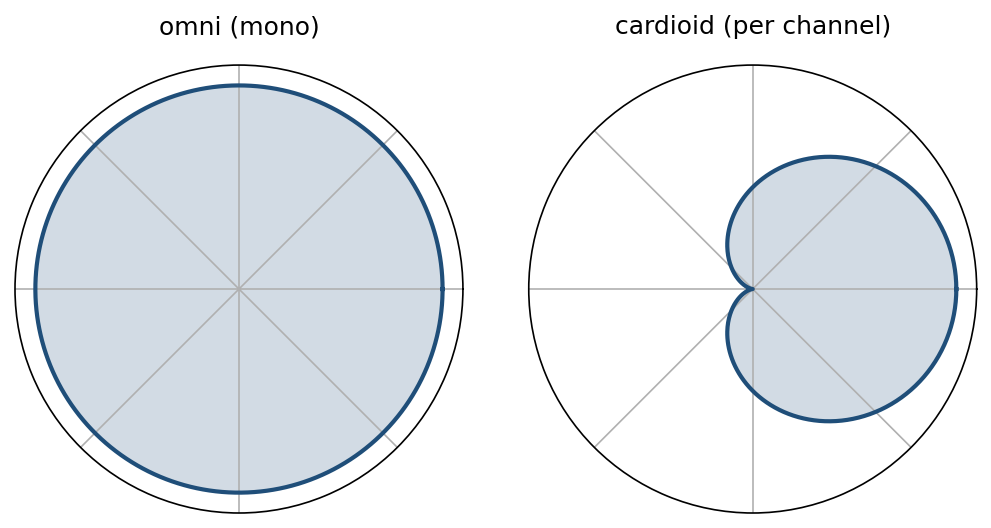
Virtual microphone sensitivity vs. direction. Cardioid pattern picks up sound from one side — rotate one per channel and you have spatial audio.

Sonification — the whole API

from strauss.sonification import Sonification
from strauss.sources    import Objects
from strauss.score      import Score
from strauss.generator  import Synthesizer

score = Score([["A2"]], length=15.)
generator = Synthesizer(); generator.load_preset("pitch_mapper")

sources = Objects(data.keys())
sources.fromdict(data); sources.apply_mapping_functions()

soni = Sonification(score, sources, generator, "stereo")
soni.render()
soni.save("galaxy.wav")

Top-level class; render() builds the audio, save() writes a .wav.

Example Applications

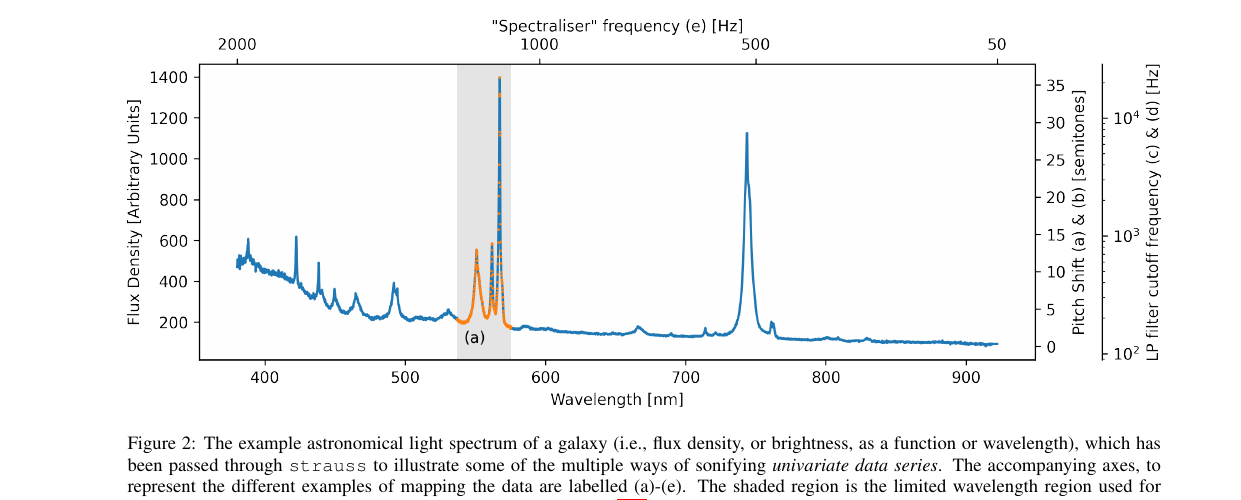
Example 1 — A Galaxy’s Light Spectrum

Blue curve: a galaxy’s brightness vs. wavelength. Five mappings, same data:

Sound source What brightness controls
(a) discrete mallet hits (one per point) pitch of each hit
(b) one steady tone pitch of the tone
(c) held chord of saw waves low-pass filter cutoff (tone color)
(d) white noise low-pass filter cutoff (tone color)
(e) the spectrum is the waveform (audification)

Example 1 — Listen

(a) mallet hits (b) pitched tone

(c) filtered chord (d) filtered noise

(e) audification

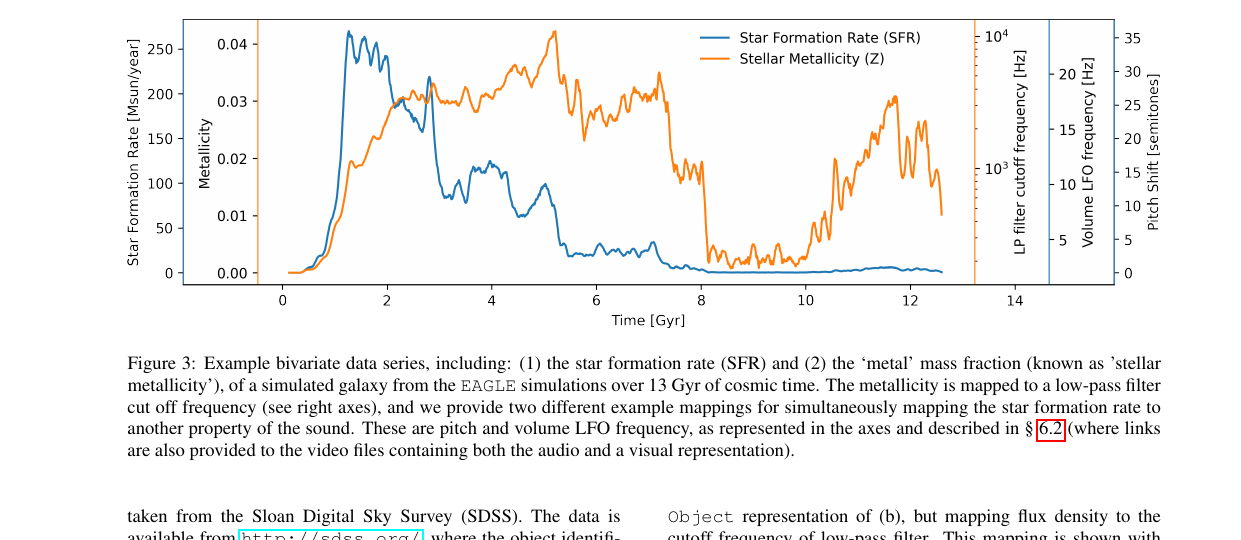
Example 2 — Two Variables Over Time

13 Gyr of galaxy history → ~30 s audio. Two mappings at once:

  • Star-formation rate (orange) → pitch
  • Heavy-element content (blue) → brightness of the sound (more = more treble, less muffled)

Listen (a) — SFR → pitch

Listen (b) — SFR → pulse rate

Example 3 — 2500 Stars in VR
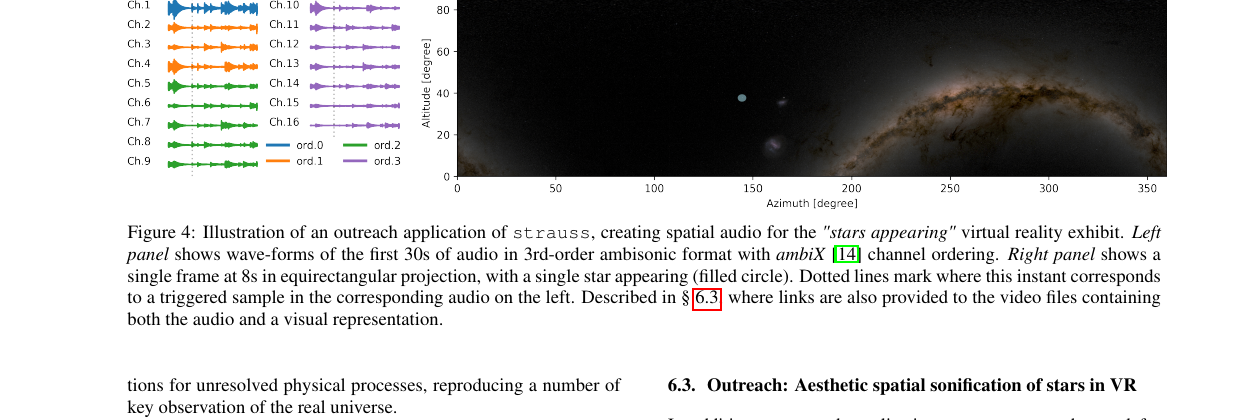
  • Each star = one short bell-like tone (glockenspiel)
  • Brightness → when it plays (bright first)
  • Color → which of 5 pitches (bluer = higher)
  • Panned to the star’s sky position

Listen (first-person view, stereo mix)

Full 3D version uses 16-channel ambisonic audio — stars heard where you see them in a planetarium dome.

Example Notebooks in the Repo

Example notebooks

Takeaways

Summary

  • strauss fills a gap between one-trick sonifiers and full DAWs
  • Modular pipeline: Sources → Score → Generator → Channels
  • Uses the same vocabulary as synths: oscillators, ADSR, LFOs, chords
  • Mapping choices are the hard part — not the code
  • See the gallery for examples: https://audiouniverse.org/research/strauss